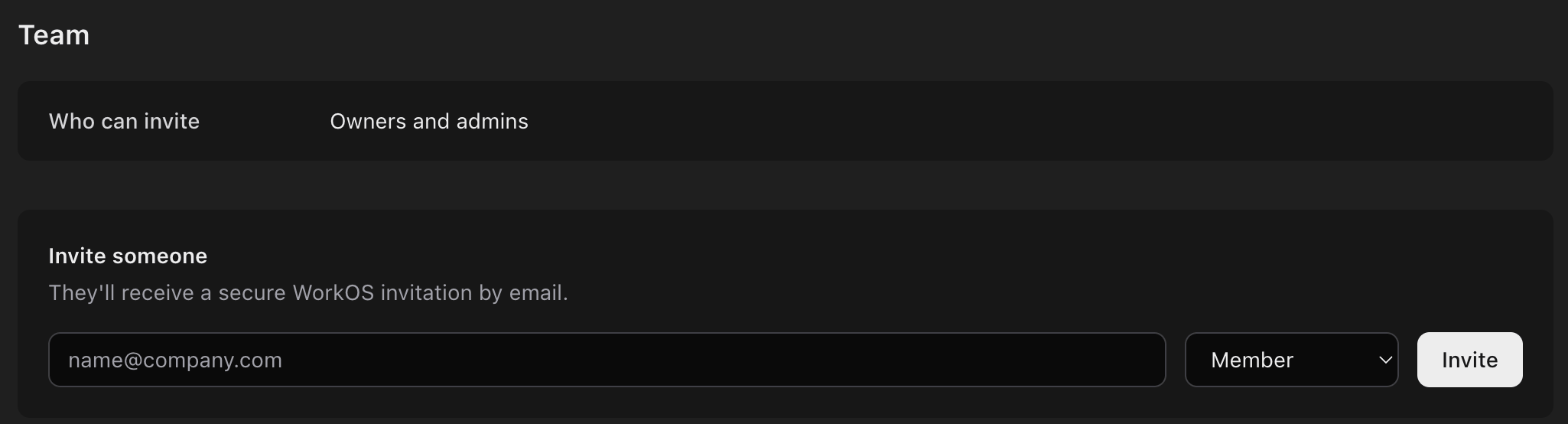
Manage who’s in your organization in Settings › Team. Everyone can see the team; Owners and Admins manage it. For what each role can do, see Organizations and roles.

Invite someone

Owners can invite people, and so can Admins when Who can invite says Owners and admins. To change this setting, contact ZeroGen.
  1. Under Invite someone, enter the person’s email address.
  2. Choose Member or Admin. Owners can also invite Owners.
  3. Choose Invite.
Settings, Team: Who can invite is set to Owners and admins, and an Invite someone form with an email field, a role menu set to Member and an Invite button.
They get a secure invitation by email. See Sign in and invitations.

Manage invitations

Pending invitations lists invitations that haven’t been accepted yet, with each one’s role and when it expires.
  • Resend sends the invitation email again.
  • Revoke cancels the invitation, after you confirm.

Find members

Members lists everyone in the organization. Search by name or email, or choose a role, then choose Apply.

Change someone’s role

  1. Find the person in Members.
  2. Choose their new role, then Update.
Admins can change Members and Admins. Only Owners can change an Owner’s role or make someone an Owner.

Remove someone

Choose Remove beside the person, then confirm. They lose access to the organization, and any invitation still pending for them is revoked. What they made stays in your projects. Admins can’t remove Owners, and an organization’s last Owner can’t be removed.